
Electrical Interference
Electrical interference, or electromagnetic interference (EMI), is one of the most frequent sources of signal noise in vacuum gauge installations. Motors, relays, RF generators, plasma power supplies, and even nearby variable-frequency drives produce rapidly changing electric and magnetic fields that couple into the gauge’s analog output lines. The result is erratic voltage fluctuations—often appearing as 50/60 Hz hum, spikes, or random noise—on the standard 0–10 V signal used by most vacuum transmitters.
In practice, a gauge reading that should be steady at 5.00 V may jitter ±0.2–0.5 V, translating to pressure errors of several percent in the critical 10-3 to 10-5 Torr range. Cold cathode gauges such as the Poseidon VG-SM225 are particularly sensitive because their low ion currents are amplified internally before conversion to analog voltage. Pirani gauges like the VG-SP205 can also exhibit noise when the Wheatstone-bridge output is routed through long or unshielded cables near industrial equipment.
Digital communication offers a complete solution. The RS232 output on both Poseidon models transmits pressure data as clean serial packets immune to EMI. When analog output is required for legacy PLCs, proper cable routing and shielding become essential. Many users discover that simply relocating a gauge cable away from a servo motor or adding a ferrite bead reduces noise by 80 % or more.
Grounding Problems
Grounding issues create ground loops or floating references that inject noise directly into the measurement circuit. A common scenario occurs when the gauge chassis is grounded through its vacuum flange while the receiving PLC or controller uses a different ground point. Even small potential differences—often just a few millivolts—amplify through the analog signal path, producing low-frequency drift or 60 Hz ripple.
In vacuum furnaces or analytical instruments, multiple pumps, heaters, and gauges share the same rack or chassis. Without a single-point ground strategy, current from one device flows through the gauge cable shield, creating common-mode noise. Poseidon gauges use an RJ45 connector with isolated signal ground, but improper termination of the shield at both ends can still form a loop.
Digital RS232 operation eliminates most grounding headaches because the protocol is differential and referenced to the transmitter’s local ground. When analog must be used, connect the cable shield at the controller end only (single-point grounding) and ensure the gauge flange is not the sole ground path. A simple continuity check between gauge body and system ground often reveals hidden loops that account for 30–50 % of reported “noisy gauge” complaints.
Long Cable Issues
Cable length compounds both EMI pickup and signal degradation. The 0–10 V analog output from vacuum gauges is a low-power DC signal; runs longer than 10–15 meters act as antennas for EMI and introduce capacitive coupling and resistive drop. At 30 meters, typical unshielded cable can attenuate the signal by 5–10 % while adding several millivolts of induced noise.
Capacitance between conductors also slows response time and filters high-frequency pressure transients—critical when monitoring rapid pump-down or valve actuation. In large vacuum systems or distributed monitoring setups, cable runs of 50 meters or more are common, magnifying these effects. Poseidon’s RJ45 interface supports standard Ethernet cabling practices, allowing shielded twisted-pair cable (Cat5e or better) to reach 100 meters with negligible noise when using the digital RS232 mode.
For analog users, the solution is shorter runs or active signal conditioning. Many OEMs convert the gauge’s RS232 output to 4–20 mA or Ethernet/IP at the controller end, preserving accuracy over long distances. The VG-SP205 and VG-SM225 both ship with clear documentation on maximum recommended cable lengths for each output type, helping installers avoid problems before they appear.
Shielding Solutions
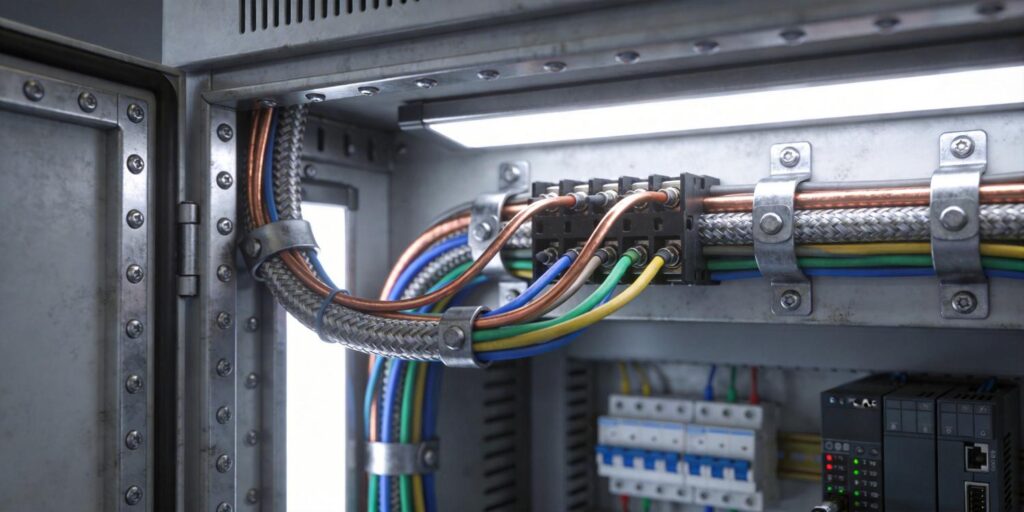
Effective shielding turns noisy installations into stable, repeatable systems. Start with shielded twisted-pair cable (24 AWG minimum) for analog runs. The twist cancels magnetic-field pickup, while the foil or braid shield blocks electric fields when properly terminated. Ground the shield at one end only—typically the controller—to avoid loops.
Additional proven techniques include:
- Ferrite beads or toroids on both ends of the cable to suppress high-frequency EMI.
- Metal conduit or braided sleeving over the full cable run in high-interference zones.
- Isolated signal conditioners or optical isolators when ground potential differences exceed 1 V.
- Digital conversion at the gauge—Poseidon’s RS232 output requires only a simple USB-to-serial adapter or direct PLC port, eliminating analog noise entirely.
Both the VG-SP205 Pirani Vacuum Transmitter and VG-SM225 Cold Cathode Vacuum Gauge feature industry-standard RJ45 connectors that accept shielded Ethernet cables, making high-quality shielding straightforward and inexpensive. Customers who switch from analog to digital routinely report noise reduction from ±0.3 V to <±0.01 V equivalent, with zero additional hardware cost.
Troubleshooting Checklist
Use this systematic checklist to isolate and eliminate signal noise in minutes rather than days.
| Step | Action | Expected Result / Pass Criteria |
|---|---|---|
| 1. Verify power supply | Measure gauge supply voltage at the connector (24 VDC ±10 %) | Stable, no ripple >50 mV |
| 2. Check ground continuity | Measure resistance between gauge body and controller ground (<1 Ω) | Single-point ground confirmed; no loops |
| 3. Inspect cable routing | Separate gauge cable from power/motor cables by ≥30 cm | Visual clearance achieved |
| 4. Test with short cable | Temporarily replace long run with 1 m shielded cable | Noise disappears → cable length/EMI issue confirmed |
| 5. Add ferrite & retest | Clip ferrite beads at both ends | Noise amplitude drops ≥70 % |
| 6. Switch to digital output | Connect RS232 and monitor via terminal or PLC | Noise-free pressure data (recommended permanent fix) |
| 7. Review error codes | Check gauge status LEDs and RS232 error bytes | No over-range, HV-fault, or sensor-pollution flags |
Poseidon gauges include built-in diagnostics—red/green LEDs and specific error codes transmitted over RS232—that speed this process. Most noise issues resolve at steps 3–6; persistent problems almost always trace to ground loops or EMI sources that digital communication bypasses completely.
Eliminate Signal Noise and Restore Confidence in Your Vacuum Data
Electrical interference, grounding problems, and long cable runs can turn reliable vacuum gauges into sources of frustration and process variability. By understanding these common causes and applying proven shielding and digital strategies, engineers achieve stable, repeatable pressure readings with minimal effort.
The Poseidon Scientific VG-SP205 Pirani Vacuum Transmitter and VG-SM225 Cold Cathode Vacuum Gauge are designed from the ground up for noisy industrial and analytical environments. Their combination of 0–10 V analog, robust RJ45 interface, and fully customizable RS232 digital output gives you the flexibility to match any control architecture while eliminating noise at the source.
Explore the VG-SP205 Pirani Vacuum Transmitter for clean rough-vacuum monitoring even in electrically harsh settings.
Discover the VG-SM225 Cold Cathode Vacuum Gauge for stable high-vacuum performance with easy digital integration.
Need help selecting the right cable, a custom RS232 protocol to bypass analog noise entirely, or a dual-gauge noise-free package? Our engineering team supports low-volume customization (starting at 5–10 units) and typically ships evaluation kits within two weeks. Contact us today—clean, trustworthy vacuum data is one conversation away.


